
What Is Labis? Your Lab Results, in One Place
Labis is a private iPhone app for your lab reports: every test with its own laboratory's range, its history, what changed between reports, and a clear PDF for your doctor.
7 min read
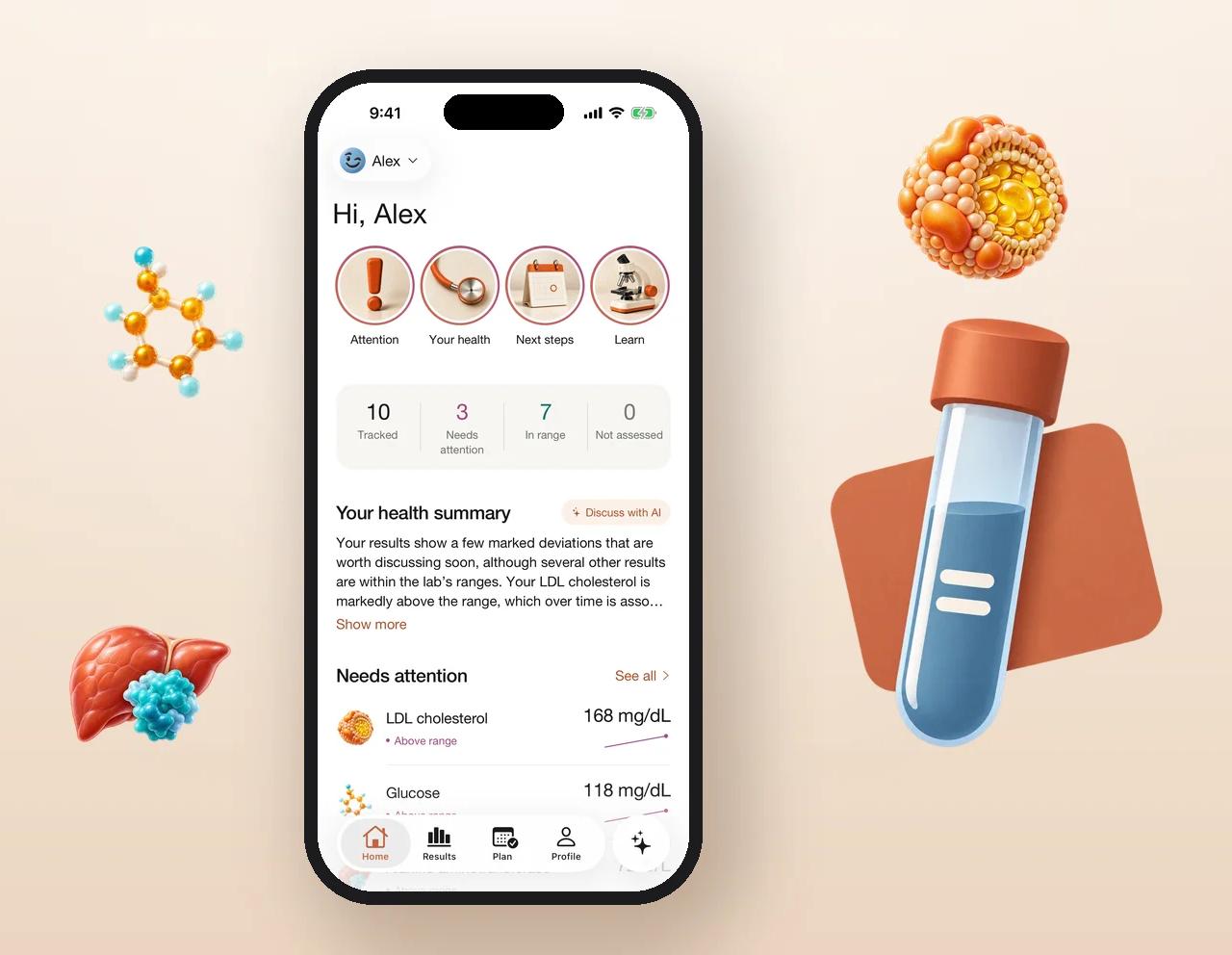
Labis is a private iPhone app that keeps your lab reports and medical documents in one place, and shows every test next to the reference range printed by the laboratory that ran it. You add a report as a PDF or a photo, check the values Labis reads from it against the original page, and from then on every result has its own history, chart and source. Labis shows what changed between reports, puts the results that need attention first, helps you prepare questions and a clear PDF for your doctor, and does the same for the people you look after. It organizes and explains in general terms. It never diagnoses or tells you what to do about a result.
Why we built Labis
Lab results end up everywhere: PDFs in email, photos on a phone, paper in a drawer, a different patient portal for every clinic. When a doctor asks how your cholesterol has changed since last year, most people can't say, and nobody wants to dig through three apps in the waiting room.
The apps that exist mostly fall into two groups: patient portals that show one clinic's results and nothing else, and generic health trackers that compare everything against a single "standard" range. Neither works for real reports, because ranges differ between laboratories, methods and units. Labis is the app we wanted instead: every report you've had, each test judged against its own laboratory's range, with the original page one tap away.
What Labis does, in one minute
- Your archive: every lab report and medical document, kept as the original file.
- Every test, with its lab's range: value, unit and the range printed on that report, with a link to the page it came from.
- History and charts: each test across all your reports, for 3 months, 6 months, a year or all time.
- Trends: pick two reports and see what moved further from its range and what came back into it.
- Needs attention: the results outside their lab's range, first on Home.
- Stories: short, visual walk-throughs of the results that need attention and of what each test measures.
- Ask Labis: an opt-in assistant that explains terms and finds things in your own records.
- Your plan and visits: reminders for repeat tests, questions for your doctor, and a doctor PDF made on your iPhone.
- Family: a profile for a child or a parent you help, and sharing with other adults on your terms.
Add a report in a minute
Scan a paper report with the camera, choose a photo, or pick a PDF. With AI reading turned on, Labis reads the tests, values, units and reference ranges from the pages; you can also enter results by hand. Every value is saved straight away and shown with the page it came from, and anything Labis isn't sure about is marked Please confirm so you can check it against the original and confirm or correct it. The original file is always kept, so the report itself stays the authoritative record.
Each result judged by its own laboratory
A ferritin of 18 can be below one laboratory's range and inside another's. That's why Labis never uses a generic range: each result is compared with the range printed on the report it came from, and labelled in plain words, such as In range, Above range or Below range. Results without a printed range say so (Not assessed) instead of guessing, and a value the laboratory itself marked critical is shown as critical. Home sums it up in four numbers: how many results you track, how many need attention, how many are within range and how many aren't compared with a range.
See what changed
Every test has its own page: the latest value, a chart of every result you've had with the lab's range shaded behind it, and the period you choose. When you have two or more reports, Trends lines them up: the results that got further from their lab's range, the ones that came back within it, and by how much, each with an arrow and a colour. Results that stayed within range on both dates are summed up in one line, so the page shows only what's worth looking at.
Stories: your results in plain words
At the top of Home, stories walk you through what matters now, one tap at a time. Each Needs attention story shows the test, the big value, where it sits on the lab's range, how far past the limit it is ("68 mg/dL over the upper limit of 100") and how it changed since your last report. Others sum up your latest results, the biggest change between reports, each group of tests, and what a test measures, with sources. Every story has a button to open the result or add a question for your next visit.
Ready for your next visit
Add a question to your visit from any result or story, keep reminders for repeat tests with the dates you were given, and create a doctor report: a PDF that starts with what to focus on (the results outside their ranges, with the previous value and the change), then your questions, then the full tables and the original pages you choose. It's made on your iPhone and you decide who gets it. Need a laboratory? Find a lab shows the ones near you on a map.
Ask Labis
Ask what a term on your report means, when you last had a test, or what changed since spring, and Labis answers from your own saved records, with the results it used. It explains in general terms; it doesn't diagnose, rule anything out or suggest treatment. AI is off until you allow it: a screen shows exactly what is sent, to whom and why, and you can turn it off in Settings at any time. Without it you can still add results by hand, view, compare and export everything.
For the people you look after
Keep a separate profile for a child you're responsible for, or for a parent who asked you to keep their records, each with their own reports, results and plan. You can also share a profile with another adult: an invitation must be accepted before anything is shared, each person gets only the permissions you choose (viewing, adding records, exporting, using the assistant), and you can remove their access at any time.
Private by design
Your records are private to your Labis account. Original documents sit in private storage that only you and the people you invite can reach. There are no ads and no advertising trackers, crash reports and analytics never include your results or documents, and nothing is sold. Export everything whenever you want, or delete your account and everything in it from Settings.
How Labis compares
| Patient portals | Health trackers | Labis | |
|---|---|---|---|
| Reports from every laboratory and clinic in one place | — | Partly | ✓ |
| Each result against its own laboratory's range | ✓ | — | ✓ |
| The original page behind every value | Partly | — | ✓ |
| History and charts for every test | Partly | ✓ | ✓ |
| What changed between any two reports | — | — | ✓ |
| Doctor PDF with your questions, made on your phone | — | — | ✓ |
| Family profiles with permissions you choose | Partly | — | ✓ |
| Assistant that reads only your own records | — | — | ✓ opt-in |
How to start
- Download Labis on iPhone and answer a few questions so Home shows what matters to you.
- Add your reports: scan the paper ones, pick the PDFs, and check anything marked Please confirm.
- Follow your results over time and create a doctor report before your next appointment. Labis is a subscription (monthly or yearly), with a free trial for eligible new subscribers.
Labis is an organizer and an educational tool, not medical advice or a substitute for a clinician. It does not diagnose, treat or recommend tests or treatment.
Frequently asked questions
Labis is a private iPhone app for your lab results and medical documents. It keeps every report in one place, shows each test with the reference range printed by its own laboratory, tracks each test over time, shows what changed between reports, and creates a doctor PDF on your phone.
No. Labis shows where each result sits against its laboratory's range and explains terms in general, but it does not diagnose, rule out conditions or suggest treatment. Talk to a clinician about your results.
From your laboratory report. Ranges differ between laboratories and methods, so Labis uses the range printed for that test on that report, with a link to the page it came from, instead of a generic range.
Every value is shown with its source page. Anything Labis isn't sure about is marked Please confirm, and you can confirm or correct any value; the original document is always kept.
Yes. Create a profile for a child you're responsible for or an adult who asked you to, and share a profile with another adult. Each person gets only the permissions you grant, and you can remove access at any time.
Labis is a subscription with monthly and yearly plans and a free trial for eligible new subscribers; the App Store shows the price before you confirm.